Help
Everything on this page comes from the program itself. If something changes there, it changes here too.
Common questions
Do I need internet at the field?
No. Whatever you have opened once stays on the device. It only goes when you sign out and after a new release of Routetree; the next time you are online it is back. So stay signed in and open the playbook once before you play without a connection.
Does this fit our game format?
Seven to choose from: flag 5 on 5, and tackle with 11, 9, 9 on a narrow field, 7, 6 or 5. You are asked when you create the team; after that the field, the formation and the rule notes are right by themselves. Every figure comes from the rulebook of that form and is not converted from another.
Do the inserts fit our wristbands?
Three templates are included: youth 95 × 57 mm, standard 127 × 70 mm and large 133 × 83 mm. If none of them fits, you enter your own window size and get the cutting allowance with it.
Does every player have to pay?
No. The club pays one price, not the individual players. The team reads along free of charge, however big it is.
Can other clubs see our plays?
No. Each team sees only its own playbook. Another club cannot get to it, not even through a forwarded link.
Can we bring over our existing playbook?
Not as a file. You redraw the plays once, and after that they are yours in clean measurements. The library takes the worst part off your hands: ten finished concepts are there, matching your format, with formation and routes. Nobody starts on a blank page.
Can we get back out?
Any time. Everything can be taken out as PDF and as an archive, and with a subscription as SVG too. If we part ways, reading and printing remain. Only editing is locked; nothing is deleted.
What does it cost?
The whole team reads and drills along for free, however many there are. You only pay for drawing: 8,00 € a month for the whole club, including 5 seats for coaches and staff. If you need more, you pay 15,00 € and get as many as you like.
Set up an account and try it out. If you want to go into the season with it, we unlock it and settle up with the club.
What happens to our plays if we stop?
They stay yours. A limit here never locks anything that already exists, and you can download everything as a file at any time: playbooks, plays, formations, with all coordinates. No subscription, no request, one click.
We are a school. Does this cost anything?
No. A school team gets Routetree free, in full and without a banner on the printout. Pupils do not have to give a name, and at the end of the school year the access ends by itself. How to apply for it.
What can the free demo do?
Almost everything: draw, print, have the team practise, hand out seats. What is limited is the scope, namely 1 playbook with up to 8 plays. Printouts carry a “DEMO, not for game day” stripe so no demo insert ends up in a wristband on Saturday by accident. And the demo does not hand out SVG files, because the stripe could be removed from them in ten seconds. The coaching staff only sees the team’s learning progress with a subscription; it is counted all the same, so nobody starts from zero later. With a subscription all four fall away.
Do we have to give any details first?
Name, club and an email address for resetting the password. No payment details, no contract, no deadline that renews by itself.
Every function
For each: what it does, where you find it and what to keep in mind.
Getting started
- Create account
- Creates club, team and your account in one step. Home page, button “Start for free”. The club starts in the demo: one playbook, eight plays, printouts with a banner.
- Report something
- Sends us a bug or a wish, with or without an account. In the footer under “Feedback”.
- Subscribe
- Takes the demo club to a paid account. Everywhere a limit of the demo shows up.
- My overview
- Takes you to your teams and their playbooks. After signing in, and via the logo at the top left.
- Offline
- Shows up when the phone has no connection right now. Appears by itself when a page cannot be loaded. Whatever you opened before stays readable.
- Home page
- Shows what Routetree can do and leads to signing up. At routetree.de, without signing in.
- Pricing
- States what a subscription costs and which limits it lifts. In the footer and in the menu.
- Help
- This page: every function, the line types, the printouts and the rulebooks. In the footer of every page.
- Public funding
- Explains which funding a club can tap and works out its own share. In the footer under “Funding”. For the application you usually only need a quote, and this page makes one.
- School licence
- Applies for free access for schools and school clubs. In the footer under “For schools”.
- The route tree
- The ten routes and their numbers, each one drawn. In the footer of every page, under “Route tree”.
- Rulebooks compared
- AFVD, IFAF, NFL FLAG, FIDAF, FEFA, FFFA and FMFA side by side, with a source for every figure. In the footer of every page, under “Rulebooks compared”.
- Plays explained
- The ready-made concepts from the library, each one drawn and with a paragraph on what it runs against. In the footer of every page, under “Plays explained”.
Account
- Subscribe
- Choose a tier, say whether you buy as a club or privately, then order with obligation to pay. On the subscription page, when the demo reaches a limit. You enter your card details at Stripe, never with us. As a private individual you have a 14-day right of withdrawal.
- Cancel contracts
- Ends your subscription at the end of the paid period. In the footer of every page, reachable without signing in. You keep access until the end of the paid month; the playbooks remain.
- Withdraw from contract
- Unwinds the contract from the start; the money comes back. In the footer of every page, reachable without signing in. Only for private individuals and only within the first 14 days. A club cancels instead.
- Connect Analysis
- Connects Routetree Analysis to your account without your password being entered there. In Analysis, button “Connect to Routetree”. Pressing the button here is the consent. Without it, nothing is connected.
- Account details and password
- Change your name, email address and password. In your account, under “Account”. The new email address only takes effect once you have opened the link in it. Resetting your password depends on it.
- Sign in
- Gets you in with your username and password. Top right, button “Sign in”.
- Delete account
- Deletes your account and your access to every team. At the bottom of your account. The team’s playbooks stay. They belong to the club, not to you.
- Forgot your password
- Sends you a link for setting a new password. On the sign-in screen under “Forgot your password”. The link is valid briefly and only once.
- Report content, even without an account
- Reports content that breaks the community rules or is unlawful. In the footer of every page, “Report content”. This route is open to anyone, even without an account. If you are signed in and can see the content, the play's menu is quicker.
- Legal notice and privacy
- Who runs this site and what happens to your data. In the footer of every page.
Team
- New school year
- Clears the roster for the new season and keeps the playbooks. On the team page under “New school year”.
- Create a team
- Adds another team to the club, U14 alongside U17 for instance. On the overview, button “Create team”. Each team has its own playbooks, its own roster and its own team code.
- Team
- Shows a team’s playbooks, roster and access in one place. Via the overview, then on the team’s name.
- Edit team
- Changes the team's name, form of the game, club colour and logo. On the team page, button “Edit”. The form of the game sets field size and formation. Playbooks that already exist keep their field; only new ones follow the new form.
- Delete team
- Deletes the team with all its playbooks, the roster and every way in. On the team page, button “Delete team”. Only the head coach, and only after typing the name.
- Club
- Changes the club’s name and crest. The crest appears on every printout. On the overview, button “Club”.
- Access
- Shows who may see the team, and in which role. On the team page under “Access”. Head coach may change everything, coach may draw, viewer may only read.
- Roster
- Records what a player is called in the team and which number they wear. On the team page, in the roster.
- Learning assignment
- Ticks the plays a player should learn next. On the team page, next to the name in the roster. The player still sees everything; their tasks come first in practice mode.
- Invitations
- Sends personal e-mail invitations to new coaches. On the team page under “Invitations”. An invitation is for one person; for the whole team use the team code.
- Team code
- Creates a code that lets players join as viewers. On the team page under “Team code”. Whoever has the code gets in: pass it on inside the team only.
- Join with a team code
- Gets you into a team with a code, without an invitation. routetree.de/beitreten, or via the link the coach sends.
Playbook
- Create a playbook
- Creates a new playbook, empty or from the library. On the team page, button “Create playbook”. The demo gives you one playbook; with a subscription as many as you like.
- Playbook
- Shows all plays of the playbook as tiles, grouped by category. On the team page, then on the playbook’s name.
- Edit playbook
- Changes the name, season and description of the playbook. The field stays as it is. In the playbook, button “Edit”.
- Categories
- Creates the playbook’s sections and gives each one a colour. In the playbook under “Categories”. The colour shows on playcards, call sheet and insert. It is the fastest way to find a play on the sideline.
- Play list
- The same plays as a list, for quick reordering and renaming. At the top of the playbook, switch “List”. When reordering you can let the numbers follow along or leave them.
- Sideline
- Shows the playbook large and grouped by game situation, for the tablet on the field. In the playbook under “Sideline”.
- Build a formation
- Keeps a formation without a play being created for it. In the playbook under „Build a formation“. Only where the players stand is saved. There are no lines here.
- Report content
- Reports a play that breaks the community rules. In the play's menu, “Report”, in the browser and in the app. We review every report by hand. Your team's administrator can help faster: they can remove members and delete content themselves.
- Library
- Copies ready-made plays from our collection into your playbook. In the playbook under “Library”. Copied plays are copies: you may change them without changing the original.
- Playcards, call sheet, wristcoach inserts and images, each with a preview. In the playbook under “Print”. Every output asks the same four questions: what goes on it, how many, how big, what a cell looks like.
Editor
- Create play
- Creates a new play with the starting formation. In the playbook, button “Draw a play”.
- Draw a play
- Places figures and draws routes, motions, blocks and zones. In the playbook, tap a tile. Points snap to half yards and 45 degrees; snapping can be switched off.
- View a play
- Shows the play large, without the risk of changing it. In the playbook, tap a tile if you may only watch.
Practise
- Practice mode
- Quizzes plays: who runs where, what the play is called, which situation. In the playbook under “Practise”. Progress is counted; three correct in a row count as learned.
- Learning progress
- Shows the coaching staff which play each player has learned. In the playbook under “Progress”.
Printouts
- Playcards pdf
- All plays as cards on A4, to cut out or file away.
- Call sheet pdf
- A4 landscape, arranged by the situations on the play. A play appears in every block it fits.
- Wristcoach inserts pdf
- Inserts for the wristband, with a cut zone and corner marks.
- Images to reuse zip
- Every play as SVG, all together in one archive. A vector image stays sharp at any size.
- Play-Blatt pdf
- One play large on A4, with the notes underneath.
- As an image svg
- The play as SVG, to drop into a presentation.
The figures in a play
- Offense: a circle. The abbreviation sits inside the shape.
- Defense: a square. Otherwise the same: abbreviation inside the shape, on the other side of the line of scrimmage.
Lines in the play
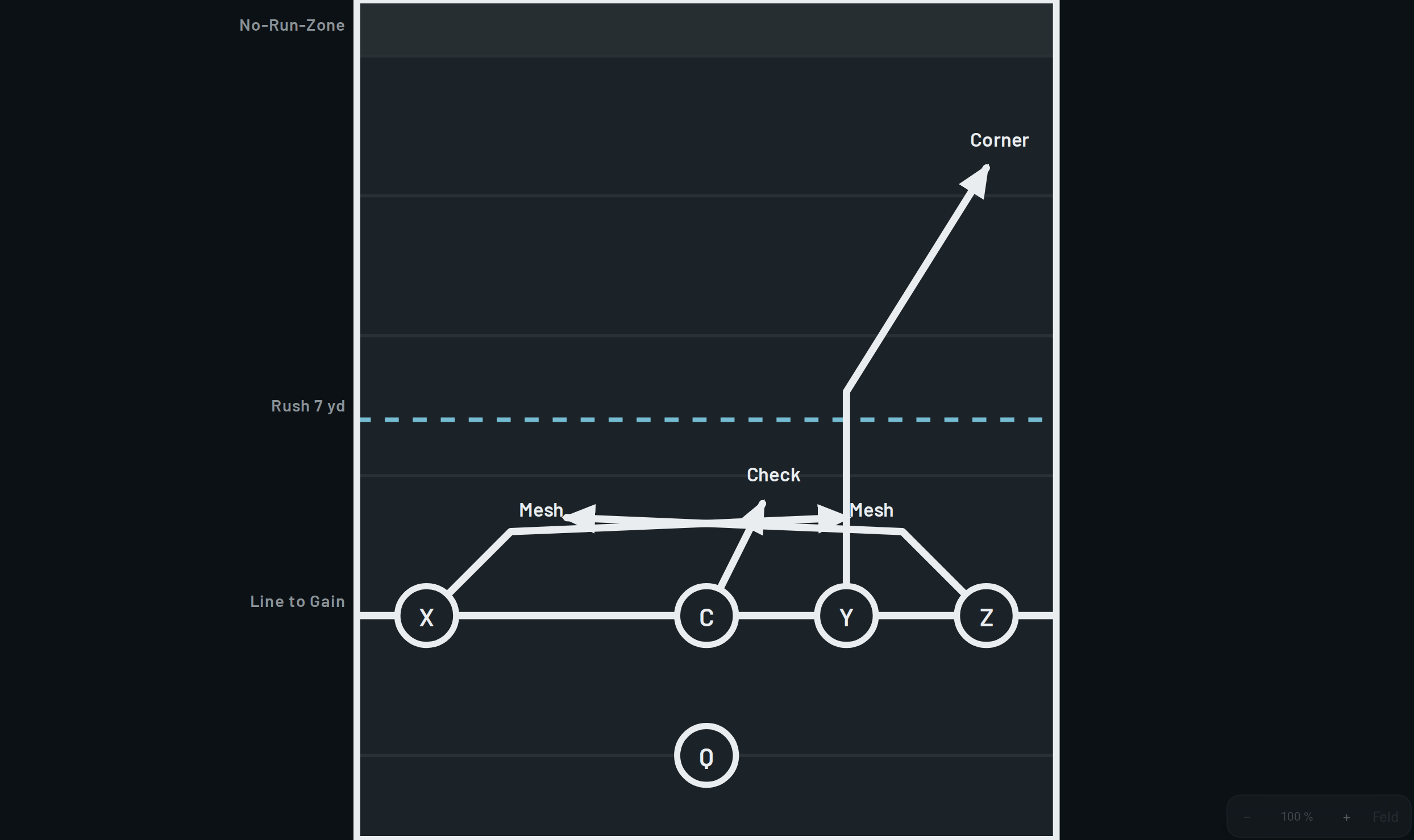
- Route
- Route
- Motion before the snap
- Motion
- Screen block
- Block
- Handoff
- Snap
- Pass path
- Pass
- Zone responsibility
- Zone
- Option route
- Option
What sits at the end of a line
- Arrow: running path or route
- Crossbar: sit route or block point
- open, continues
Tools in the editor

The same text appears on the button itself when you hover over it. The keys in brackets work on a computer.
- Large view without tools, for the team
- Vector image for presentations. Stays sharp at any size.
- Does this play break the community rules?
- Remove this play from the playbook
- Create a new play
- Round new lines smoothly (K)
- Snapping (F): close to half yards and 45-degree steps it snaps, otherwise the point stays where you put it. Alt or Shift switches it off briefly.
- Show route names on the lines (N). On the printout they always appear.
- Undo (Ctrl+Z)
- Redo (Ctrl+Shift+Z)
- Delete the selection (Del)
- Play the routes through
- Save the play and lock it against accidental changes
- Back to the start
- Save the playback as a moving image, to pass on
- Close the playback
- Smaller (−)
- Larger (+)
- Whole field (0)
- Collapse and expand the form
- Add another attacker
- Add another defender
- Left becomes right. The direction of attack stays.
Game situations
The Call Sheet is organised by these. A play appears in every block it fits.
- Openers
- The first plays, decided in advance
- 1st down
- First down, everything still open
- 2nd & short
- Second down, not far to go
- 2nd & long
- Second down, a long way to go
- 3rd & short
- Last down, not far to go
- 3rd & medium
- Last down, medium distance
- 3rd & long
- Last down, a long way to go
- Red zone
- Close to the end zone
- No-running zone
- Has to be a pass · Only in: Flag football, 5 on 5, Tackle football, 5 on 5
- Two-minute
- Clock is running, sideline and timeouts matter
Flag rulebooks to choose from
You choose one in the playbook; it sets rush distance, downs and squad sizes.
- AFVD 2026
-
Erwachsene · U16 · U13 · U10 · U7
Rulebook as PDF - IFAF 2023
-
Erwachsene · U16 · U13
Rulebook as PDF - NFL FLAG 2025
-
HS · 14U · 12U · 10U · 8U · 7U · 6U
Rulebook as PDF - FIDAF 2024
-
Erwachsene · U16 · U13
Rulebook as PDF - FEFA 2023
-
Erwachsene · U16 · U13
Rulebook as PDF - FFFA 2023
-
Erwachsene · U16 · U13
Rulebook as PDF - FMFA 2023
-
Erwachsene · U17 · U15 · U14 · U12 · U10 · U8 · U6
Rulebook as PDF
Where the measurements of each form of the game come from
Field, end zone, hashmarks and formation rule are taken from the rulebook of that form. No figure is converted from another form.
- Flag football, 5 on 5
-
The German flag league and the regional leagues. No contact, rush line at 7 yards, midfield is the line to gain.
Rulebook as PDF - Tackle football, 11 on 11
-
The top German leagues and the national youth league. Full-size field, at most four backs, five players numbered 50 to 79 on the line.
Rulebook as PDF - Tackle football, 9 on 9
-
In Germany this is played on the full-size field (four of the state associations, and the second women's league). No kickoff, three players numbered 50 to 79 on the line.
Rulebook as PDF - Tackle football, 9 on 9, narrow field
-
This is how the rest of Europe plays it: Italy 45 yards wide, Austria and Switzerland 43⅓. Germany is the exception when it comes to the field.
Rulebook as PDF - Tackle football, 7 on 7
-
The Hesse, Rhineland-Palatinate and Saar association, plus Baden-Württemberg. Field 32 metres wide, four on the line. Up to U16, only one player from the backfield may charge immediately after the snap, and only through the middle. In the women's game Hesse requires five on the line, Baden-Württemberg four.
Rulebook as PDF - Tackle football, 6 on 6
-
Bavaria only, after American six-man football. Field 80 by 40 yards, first down after 15 instead of 10, and the ball must be handed off once before it may cross the neutral zone.
Rulebook as PDF - Tackle football, 5 on 5
-
One German state association, down to under 10s. Closer to flag than to tackle: a single rusher, seven seconds to throw, a no-run zone, and no chain crew.
Rulebook as PDF
Fields in the forms
Create a team
- What does this team play?
- Flag or tackle, and with how many players. It determines the field size, the formation and the rule notes in the editor.
- Club colour
- Used for this team's tiles and accents.
- Logo
- PNG or JPG, square works best. 3 MB at most.
Create a playbook
- Game format
- Only change this if this one playbook uses a different game format than the team.
- Field size
- The IFAF standard size, and the usual choice. The other two are the permitted national variation.
- Rulebook
- Does NOT change the dimensions. It decides what the editor flags and what breaks when you switch.
- Competition class
- Under IFAF rules this only changes the ball size. In NFL FLAG, 8U and younger play without a rush.
- Create the usual categories right away
- Short Pass, Deep Pass, Red Zone and Trick — changeable later.
Create account
- Club
- The name you play under.
- First team
- You add further teams later.
- What does this team play?
- Sets field size, formation and rule notes. Can be changed later.
- For resetting the password. We will not write to you for anything else.
- Benutzername
- What you sign in with. Letters, digits and @ . + - _ are allowed.
- Password
- At least 8 characters, not just digits and nothing too obvious.
- Repeat the password
- Once more, to be safe.
Join with a team code
- Benutzername
- What you sign in with. Letters, digits and @ . + - _ are allowed.
- Password
- Your password can’t be too similar to your other personal information.
- Your password must contain at least 8 characters.
- Your password can’t be a commonly used password.
- Your password can’t be entirely numeric.
- Repeat the password
- Once more, to be safe.
- First name
- So the team recognises you in the access list.
Report something
- What is going on?
- What did you do, what happened, what did you expect? The more precise, the faster we find it.
- E-mail, if you want us to write back
- Optional. Without it we cannot ask you anything.
Club
- Club logo
- Leave empty: then your first team’s logo applies.
Demo and subscription
| What | Demo | Default | Premium |
|---|---|---|---|
| Teams per club | 1 team | up to 2 teams | unlimited |
| Playbooks per club | 1 playbook | up to 3 playbooks | unlimited |
| Plays per playbook | 8 plays | unlimited | unlimited |
| Coaches who can draw | unlimited (but only 1 team) | up to 5 | unlimited |
| Players and spectators | unlimited, free | unlimited, free | unlimited, free |
| Printouts | with the banner “DEMO, not for game day” | clean, no banner | clean, no banner |
| Drawing, practice, roster, team code | full | full | full |
| Team learning progress, assignments | not in the demo | full | full |